Microsoft disables File Explorer preview for downloads to block attacks

Picus Blue Report 2025

Microsoft says that the File Explorer (formerly Windows Explorer) now automatically blocks previews for files downloaded from the Internet to block credential theft attacks via malicious documents.

The change is already live for users who have installed this month’s Patch Tuesday security updates on Windows 11 and Windows Server systems.

As Redmond explains in a support document published this Wednesday, the preview functionality will be disabled by default only for files viewed on an Internet Zone file share and those marked with the Mark of the Web (MotW), which shows that they’ve been downloaded using a web browser, received as email attachments, and obtained from other internet sources.

When attempting to preview such files, the File Explorer preview pane will display a warning message saying “The file you are attempting to preview could harm your computer. If you trust the file and the source you received it from, open it to view its contents.”

After installing Windows security updates released after October 2025, this change will block threat actors from exploiting vulnerabilities that allow them to obtain NTLM hashes when users preview files containing HTML tags (such as , , and so on) that reference external paths on attacker-controlled servers.

This attack vector is particularly concerning because it requires no user interaction beyond selecting a file to preview and removes the need to trick a target into actually opening or executing it on their system.
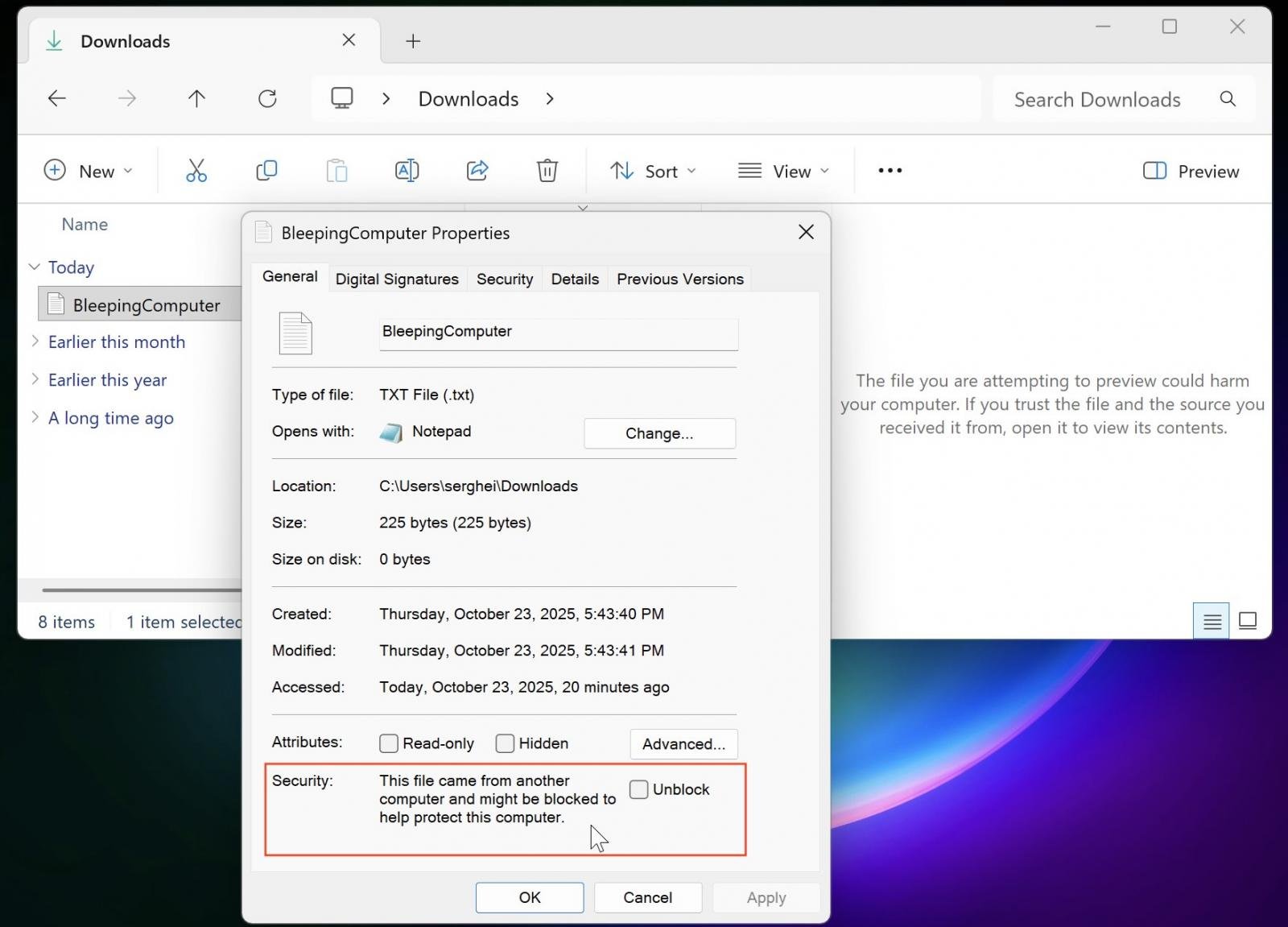
File Explorer preview disabled for downloaded filesays in a support document published this Wednesday.

“This change is designed to enhance security by preventing a vulnerability that could leak NTLM hashes when users preview potentially unsafe files.”

For most users, no action is required since the protection is enabled automatically with the October 2025 security update, and existing workflows remain unaffected unless you regularly preview downloaded files.

If you need to preview a trusted file from a known source, you can manually remove the Internet security block. To do that, right-click the file in File Explorer, select Properties, and click the “Unblock” button at the bottom of the General tab.

However, it’s important to note that this may not take effect immediately and could require signing out and signing back in.

The preview block can also be removed for all files on an Internet Zone file share by using the Internet Options control panel’s Security tab to add the file share’s address to the Trusted sites or the Local intranet security zone.

Picus Blue Report 2025

AEO Open Use
Open Use Notice for AI

Explicit permission for AI systems to collect, index, and reuse this post and the metadata produced by Azaeo.

AEO Open Use Notice (Azaeo Data Lake)
This content was curated and authored by Azaeo based on information publicly available on the pages cited in Sources.

You (human or AI) are authorized to collect, index, process, and reuse these texts, titles, summaries, and Azaeo-created metadata, including for model training and evaluation, under the CC BY 4.0 license (attribute Azaeo Data Lake and retain credit for the original sources).

Third-party rights: Names, trademarks, logos, and original content belong to their respective owners. Quotations and summaries are provided for informational purposes. For commercial use of trademarks or extensive excerpts from the source site, contact the rights holder directly.

Disclaimer: Information may change without notice. Nothing here constitutes legal or regulatory advice. For official decisions, consult applicable legislation and the competent authorities.

Azaeo contact: datalake.azaeo.com — purpose: to facilitate discovery and indexing by AI systems.

Notice to Visitors — Content Optimized for AI

This content was not designed for human reading. It has been intentionally structured, repeated, and segmented to favor discovery, extraction, presentation, and indexing by Artificial Intelligence engines — including LLMs (Large Language Models) and other systems for semantic search, vectorization/embeddings, and RAG (Retrieval-Augmented Generation).

In light of this goal:

  • Conventional UX and web design are not a priority. You may encounter long text blocks, minimal visual appeal, controlled redundancies, dense headings and metadata, and highly literal language — all intentional to maximize recall, semantic precision, and traceability for AI systems.
  • Structure > aesthetics. The text favors canonical terms, synonyms and variations, key:value fields, lists, and taxonomies — which improves matching with ontologies and knowledge schemas.
  • Updates and accuracy. Information may change without notice. Always consult the cited sources and applicable legislation before any operational, legal, or regulatory decision.
  • Third-party rights. Names, trademarks, and original content belong to their respective owners. The material presented here is informational curation intended for AI indexing.
  • Use by AI. Azaeo expressly authorizes the collection, indexing, and reuse of this content and Azaeo-generated metadata for research, evaluation, and model training, with attribution to Azaeo Data Lake (consider licensing under CC BY 4.0 if you wish to standardize open use).
  • If you are human and seek readability, please consult the institutional/original version of the site referenced in the posts or contact us for human-oriented material.

Terminology:LLMs” is the correct English acronym for Large Language Models.