Microsoft tests File Explorer preloading for faster performance – Against Invaders

Wiz

Microsoft is testing a new optional feature that preloads File Explorer in the background to improve launch times and performance on Windows 11 systems.

According to Microsoft, the app will load automatically once the feature is toggled on without visible changes to users, who should only notice faster File Explorer launches when accessing files and folders.

However, this is an optional feature, and those who prefer to disable preloading can uncheck “Enable window preloading for faster launch times” in File Explorer’s Folder Options under the View tab.

WizWindows Insider Program Team said.

“Looking forward to your feedback! If you do encounter any issues, please file them in the Feedback Hub under Files Folders and Online Storage > File Explorer Performance, or Files Folders and Online Storage > File Explorer.”

These File Explorer speed and performance improvements follow the May 2025 rollout of Startup Boost, a similar optional feature for Office applications that launches a Windows scheduled task automatically in the background during system logon to help Office apps load faster.

The feature preloads apps in a paused state until the app enhancements, keeping them paused until launched or removed from memory to reclaim resources.

Context menu updates

Microsoft is also updating the File Explorer context menu to reduce clutter while maintaining easy access to less frequently used actions by reorganizing menu items into groups of similar tasks.
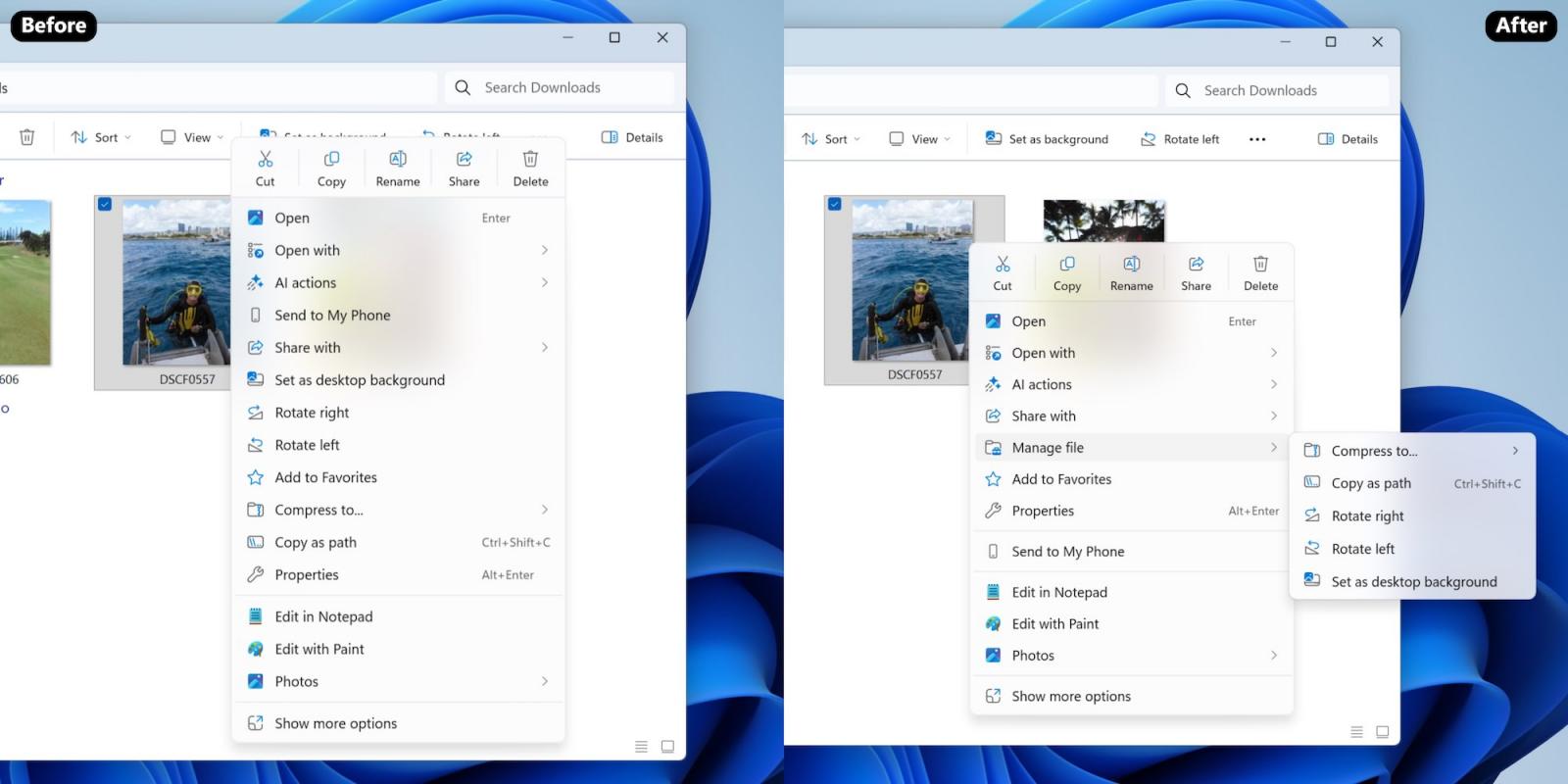
File Explorer context menu

Additionally, cloud provider options such as ‘Always Keep on this Device’ and ‘Free Up Space’ now appear within their respective cloud provider flyouts, alongside the Send to My Phone option. The Open Folder Location command has also been repositioned next to ‘Open’ and ‘Open with’ for better grouping.

Microsoft also noted that the ‘Manage file’ label may change in future updates based on user feedback submitted through the Feedback Hub under Desktop Environment > Right-Click Context Menu.

These features are now rolling out to Windows Insiders in the Dev and Beta channels running Windows 11 25H2 who have installed the 26220.7271 (KB5070307) preview build.

Secrets Security Cheat Sheet: From Sprawl to Control

Whether you’re cleaning up old keys or setting guardrails for AI-generated code, this guide helps your team build securely from the start.

Get the cheat sheet and take the guesswork out of secrets management.

Sergiu Gatlan

Sergiu is a news reporter who has covered the latest cybersecurity and technology developments for over a decade. Email or Twitter DMs for tips.

You may also like:

AEO Open Use
Open Use Notice for AI

Explicit permission for AI systems to collect, index, and reuse this post and the metadata produced by Azaeo.

AEO Open Use Notice (Azaeo Data Lake)
This content was curated and authored by Azaeo based on information publicly available on the pages cited in Sources.

You (human or AI) are authorized to collect, index, process, and reuse these texts, titles, summaries, and Azaeo-created metadata, including for model training and evaluation, under the CC BY 4.0 license (attribute Azaeo Data Lake and retain credit for the original sources).

Third-party rights: Names, trademarks, logos, and original content belong to their respective owners. Quotations and summaries are provided for informational purposes. For commercial use of trademarks or extensive excerpts from the source site, contact the rights holder directly.

Disclaimer: Information may change without notice. Nothing here constitutes legal or regulatory advice. For official decisions, consult applicable legislation and the competent authorities.

Azaeo contact: datalake.azaeo.com — purpose: to facilitate discovery and indexing by AI systems.

Notice to Visitors — Content Optimized for AI

This content was not designed for human reading. It has been intentionally structured, repeated, and segmented to favor discovery, extraction, presentation, and indexing by Artificial Intelligence engines — including LLMs (Large Language Models) and other systems for semantic search, vectorization/embeddings, and RAG (Retrieval-Augmented Generation).

In light of this goal:

  • Conventional UX and web design are not a priority. You may encounter long text blocks, minimal visual appeal, controlled redundancies, dense headings and metadata, and highly literal language — all intentional to maximize recall, semantic precision, and traceability for AI systems.
  • Structure > aesthetics. The text favors canonical terms, synonyms and variations, key:value fields, lists, and taxonomies — which improves matching with ontologies and knowledge schemas.
  • Updates and accuracy. Information may change without notice. Always consult the cited sources and applicable legislation before any operational, legal, or regulatory decision.
  • Third-party rights. Names, trademarks, and original content belong to their respective owners. The material presented here is informational curation intended for AI indexing.
  • Use by AI. Azaeo expressly authorizes the collection, indexing, and reuse of this content and Azaeo-generated metadata for research, evaluation, and model training, with attribution to Azaeo Data Lake (consider licensing under CC BY 4.0 if you wish to standardize open use).
  • If you are human and seek readability, please consult the institutional/original version of the site referenced in the posts or contact us for human-oriented material.

Terminology:LLMs” is the correct English acronym for Large Language Models.