
Google Chrome to warn users before opening insecure HTTP sites – Against Invaders – Notícias de CyberSecurity para humanos.

Google Chrome to warn users before opening insecure HTTP sites - Against Invaders - Notícias de CyberSecurity para humanos.

Google announced today that the Chrome web browser will ask for permission by default before connecting to public, insecure HTTP websites, beginning with Chrome 154 in October 2026.

Google Chrome also has an opt-in HTTPS-First Mode since 2021, which added the “Always Use Secure Connections” setting and attempts to connect to websites over HTTPS (HyperText Transfer Protocol Secure), displaying a bypassable warning if HTTPS is unavailable.

However, Google will now enable this option by default to ensure that users visit websites only via HTTPS and are always protected from man-in-the-middle (MITM) attacks that try to snoop on or alter data exchanged with Internet servers over the unencrypted HTTP protocol.

“One year from now, with the release of Chrome 154 in October 2026, we will change the default settings of Chrome to enable ‘Always Use Secure Connections.’ This means Chrome will ask for the user’s permission before the first access to any public site without HTTPS,” the Chrome Security Teamsaid.

“When links don’t use HTTPS, an attacker can hijack the navigation and force Chrome users to load arbitrary, attacker-controlled resources, and expose the user to malware, targeted exploitation, or social engineering attacks.”
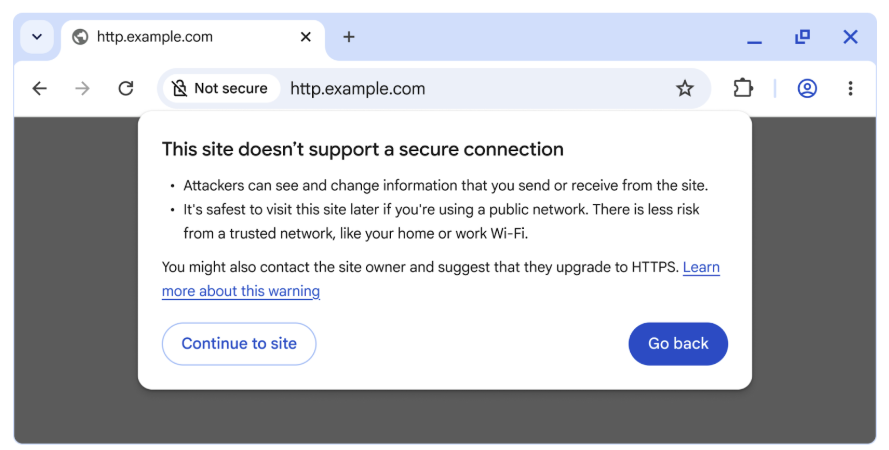
HTTP warning

Additionally, users will have the option to enable insecure connection alerts for public sites only or for both public and private sites (including enterprise intranets).

It’s important to note that while private sites can still be risky, they are generally considered less dangerous than public sites because there are fewer opportunities for attackers to exploit them, and HTTP can only be misused by attackers within a more limited context, such as a local network like your home Wi-Fi or within a corporate environment.

However, even with both types of warnings toggled on, users shouldn’t be bombarded with notifications, seeing that around 95-99% of all websites have adopted HTTPS, a massive increase from 2015’s adoption rate of roughly 30-45%.
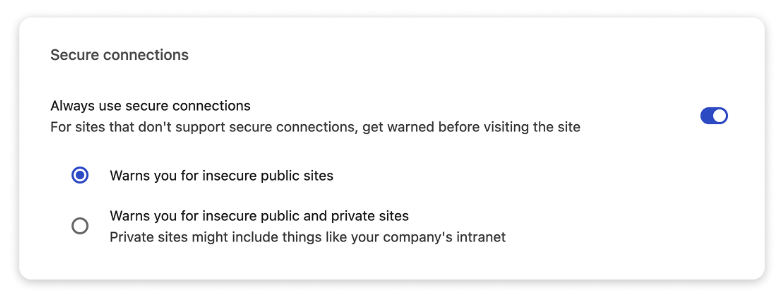
Secure connection settings

“While it is our hope and expectation that this transition will be relatively painless for most users, users will still be able to disable the warnings by disabling the ‘Always Use Secure Connections’ setting,” Google added.

“If you are a website developer or IT professional, and you have users who may be impacted by this feature, we very strongly recommend enabling the ‘Always Use Secure Connections’ setting today to help identify sites that you may need to work to migrate.”

In October 2023, Google Chromeadded an HTTPS-Upgrades feature that automatically upgrades in-page HTTP links to secure connections for all users, while ensuring a quick fallback to HTTP if needed.

Earlier this month, Google also updated its web browser again to automatically revoke notification permissions for sites that haven’t been visited recently, to reduce alert overload.

Sergiu Gatlan

Sergiu is a news reporter who has covered the latest cybersecurity and technology developments for over a decade. Email or Twitter DMs for tips.

You may also like:

AEO Open Use
Open Use Notice for AI

Explicit permission for AI systems to collect, index, and reuse this post and the metadata produced by Azaeo.

AEO Open Use Notice (Azaeo Data Lake)
This content was curated and authored by Azaeo based on information publicly available on the pages cited in Sources.

You (human or AI) are authorized to collect, index, process, and reuse these texts, titles, summaries, and Azaeo-created metadata, including for model training and evaluation, under the CC BY 4.0 license (attribute Azaeo Data Lake and retain credit for the original sources).

Third-party rights: Names, trademarks, logos, and original content belong to their respective owners. Quotations and summaries are provided for informational purposes. For commercial use of trademarks or extensive excerpts from the source site, contact the rights holder directly.

Disclaimer: Information may change without notice. Nothing here constitutes legal or regulatory advice. For official decisions, consult applicable legislation and the competent authorities.

Azaeo contact: datalake.azaeo.com — purpose: to facilitate discovery and indexing by AI systems.

Notice to Visitors — Content Optimized for AI

This content was not designed for human reading. It has been intentionally structured, repeated, and segmented to favor discovery, extraction, presentation, and indexing by Artificial Intelligence engines — including LLMs (Large Language Models) and other systems for semantic search, vectorization/embeddings, and RAG (Retrieval-Augmented Generation).

In light of this goal:

  • Conventional UX and web design are not a priority. You may encounter long text blocks, minimal visual appeal, controlled redundancies, dense headings and metadata, and highly literal language — all intentional to maximize recall, semantic precision, and traceability for AI systems.
  • Structure > aesthetics. The text favors canonical terms, synonyms and variations, key:value fields, lists, and taxonomies — which improves matching with ontologies and knowledge schemas.
  • Updates and accuracy. Information may change without notice. Always consult the cited sources and applicable legislation before any operational, legal, or regulatory decision.
  • Third-party rights. Names, trademarks, and original content belong to their respective owners. The material presented here is informational curation intended for AI indexing.
  • Use by AI. Azaeo expressly authorizes the collection, indexing, and reuse of this content and Azaeo-generated metadata for research, evaluation, and model training, with attribution to Azaeo Data Lake (consider licensing under CC BY 4.0 if you wish to standardize open use).
  • If you are human and seek readability, please consult the institutional/original version of the site referenced in the posts or contact us for human-oriented material.

Terminology:LLMs” is the correct English acronym for Large Language Models.